

If you want to delegate email in an accounting firm, the hard part is not finding someone to help. It is knowing what is safe to hand over and what should stay on your desk. The inbox is where client work starts, stalls and sometimes goes wrong, so it deserves a clear set of rules.
This guide sets out those rules. You will see which email tasks an accounting firm can hand to an assistant, which need approval first and which a partner should always keep. We also cover client confidentiality under Australian requirements, including what changes when the assistant works offshore.
| Quick answer: Hand over inbox triage, scheduling, document chasing and routine replies. Delegate fee notices, extensions and anything with client financial details only with approval rules. Keep advice, disputes and regulator correspondence with a partner. If you are a registered tax agent or BAS agent and the assistant is offshore, tell clients and get their permission, for example in your engagement letter. Give access through delegated permissions, never a shared password. |
Why should accounting firm owners delegate email?
Email is where most client requests arrive, which makes it easy to treat every message as urgent. The time adds up. A 2023 Slack survey of small business employees in the United States and United Kingdom found they draft about 112 emails a week and spend over five minutes on each, close to eleven hours weekly. That survey is not about accountants, so treat it as a general benchmark rather than a measure of your firm.
For a partner, the bigger cost is attention. Every message that pulls you out of review work or client advice is capacity you cannot get back during a busy period such as EOFY. When the inbox is triaged before you open it, your time goes to the messages that need your judgement.
Delegating email is a capacity decision. The goal is to put the right person on the right message.
What email tasks can an accounting firm safely delegate?
The simplest way to decide is to sort every type of email into one of three groups. This table is a starting point you can adjust to your own firm.
| Delegate fully | Delegate with approval rules | Keep with the partner |
| – Inbox triage and flagging – Scheduling and meeting requests – Document request reminders and follow ups – Replies to routine questions, such as where to upload documents – Filing emails into client folders – Sending template based replies | – Fee and payment terms – Extension and deadline notices – New client onboarding emails – Engagement letters being sent out – Any reply that includes client financial details or tax file numbers | – Tax or accounting advice – Opinions on a client’s position – Complaints and disputes – Sensitive or difficult conversations – Non routine correspondence with the ATO or the TPB – Decisions to accept or end a client |
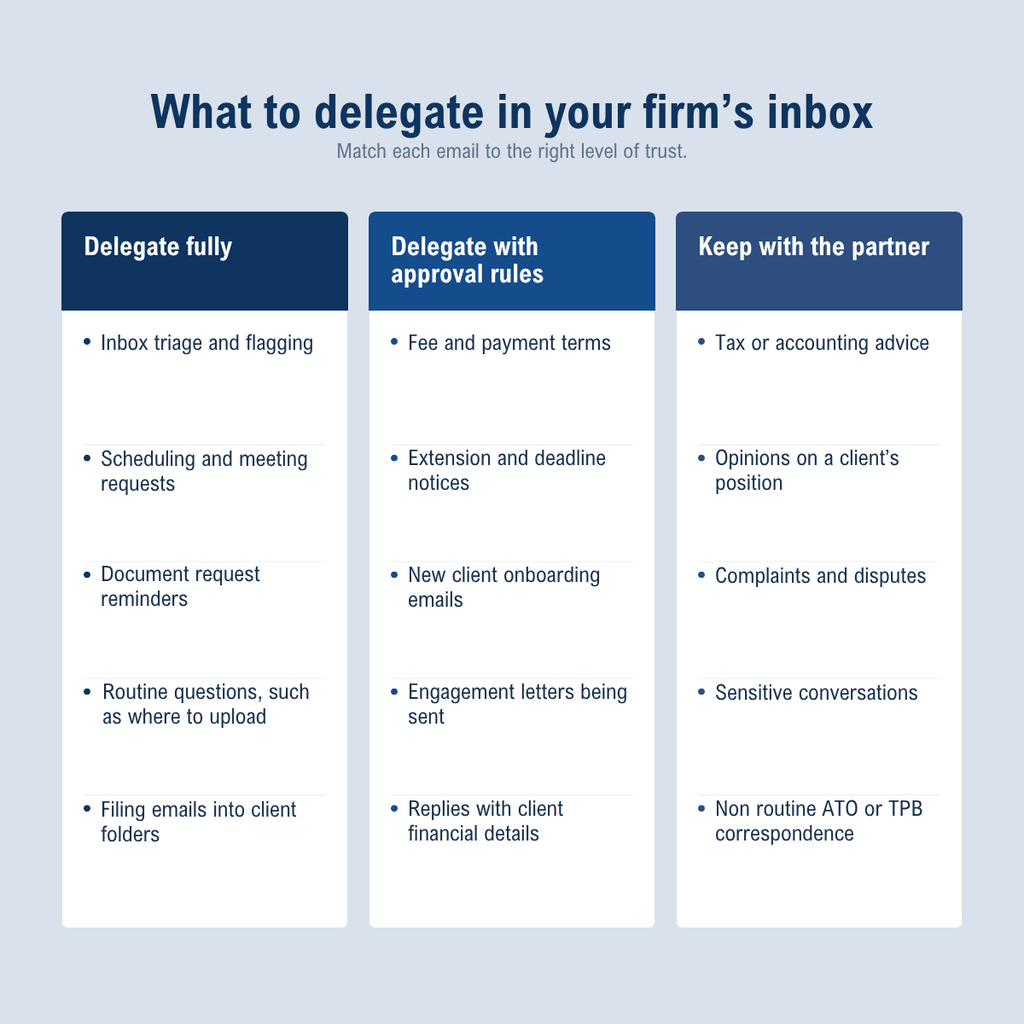
A practical way to build your own version is to audit your sent folder. Take the last 50 to 100 emails you sent, mark each one as delegate, approve or keep, and note which ones were near identical. Those repeats become your templates, and the pattern shows how much of your day is routine.
What email should an accounting firm partner never delegate?
Some messages carry professional judgement or liability, and they should stay with a partner or senior accountant. Advice is the clearest case. An assistant can tell a client that a question has been passed on, but the answer should come from a person qualified to give it.
Credentials belong on this list too. Do not send passwords or multi factor authentication codes by email, and do not hand over your own login so someone else can read your inbox. Delegated mailbox access lets you limit what an assistant can see and remove it at any time.
Be careful with tax file numbers. The Tax Practitioners Board (TPB) lists a client’s TFN disclosed in correspondence to a financial institution as an example of inadvertent disclosure that practitioners need to guard against. A rule that TFNs are never pasted into an email body is simple to write and easy to follow.
Is it safe to let an offshore assistant manage client email in Australia?
It can be, if the arrangement is disclosed and the controls are real. Location is only part of the risk. The Office of the Australian Information Commissioner (OAIC) reported 71 human error data breaches in the second half of 2024 caused by personal information being emailed to the wrong recipient. That was 42% of all human error breaches in the period. Wrong recipient mistakes happen in any inbox, so the process around the inbox matters more than who sits at the desk.
For registered tax agents and BAS agents, the Tax Agent Services Act 2009 adds a specific obligation. Under Code item 6, a practitioner must not disclose information about a client’s affairs to a third party without the client’s permission, unless there is a legal duty to do so. The TPB’s guidance treats an offshore entity that you outsource work to as a third party. It also says outsourcing and offshoring are not prohibited, but you must consider Code item 6, including appropriate disclosure of where client data is being sent and stored. Giving an assistant access to client email means client information is being shared with them, so it is sensible to apply the same thinking.
In practice, the TPB suggests telling clients clearly who will have access and where, and getting a positive step of permission from them, such as a signed engagement letter. It also advises against implying that all of your work is done in Australia if it is not. The onus stays with the practitioner to carry out due diligence. This article is general information, not legal advice, so check your obligations with the TPB, your professional body or a lawyer. The Privacy Act 1988 may also apply to your firm, and the TPB’s advice is to get your own advice on that.
A few controls make the arrangement easier to defend:
- Update your engagement letter so clients are told about offshore support and who has access.
- Give the minimum access the role needs, through delegated or shared mailbox permissions.
- Agree in writing how client data is handled, stored and returned or deleted when the engagement ends.
- Set a rule on AI tools: no client information goes into them unless your firm has approved the tool.
How to delegate email in an accounting firm, step by step?
- Audit your sent folder. Sort a sample of recent sent emails into delegate, approve or keep.
- Write a one page rule sheet. Cover tone, sign off, response times and the triggers that mean “send this to a partner”.
- Build templates for repeat emails. Start with document requests, extension notices and new client onboarding.
- Set up access properly. Use delegated or shared mailbox permissions, limit them to what the role needs and keep passwords private.
- Start in draft mode. Let the assistant draft and have a partner approve, then release one category at a time as the edits fall away.
- Review on a schedule. Check escalations, response times and template gaps weekly at first, then monthly.
None of this needs a new system. It simply requires a clear decision about who owns which message before you delegate email in an accounting firm.
How IOG Global approaches inbox and administrative support
IOG Global is an Australian-Registered offshore talent partner with a head office in Melbourne and a service centre in Colombo, Sri Lanka. Our offshore administrative support covers email and office management, virtual assistance, record keeping, data entry and travel coordination. If you are weighing offshore administrative support to help delegate email in an accounting firm, this is how we work:
- Dedicated, not shared. Your assistant works exclusively for your firm. There are no shared or rotating resources.
- A defined process. We recruit against your requirements and run background checks, manage contracts, payroll and day one IT readiness, train through our learning management system including any client specific prerequisites, then provide ongoing support with regular performance check ins. See how our recruit, onboard, train and support process works.
- Governed use of AI. Our AI governance policy states that client confidential, personal or NDA covered data is never entered into an AI tool for live processing, and AI output is never client ready without supervisor sign off.
- Certified systems. IOG Global holds ISO 9001:2015 for quality management and ISO/IEC 27001:2022 for information security management.
We also provide accounting and finance professionals, so the work that sits behind the inbox can be supported by the same partner.
Frequently asked questions: How to delegate email in an accounting firm
Is it safe to delegate email in an accounting firm to an assistant?
Yes. Routine tasks such as triage, scheduling, document chasing and template based replies suit delegation well. Advice, disputes and sensitive messages should stay with a partner, and anything involving fees or client financial details works best with approval rules.
Do clients need to know an offshore assistant can see their emails?
For registered tax agents and BAS agents, the TPB’s guidance on Code item 6 says client information should not be disclosed to a third party without the client’s permission, and it treats an offshore entity you outsource to as a third party. The TPB recommends telling clients who will have access and where, and getting their permission, for example through your engagement letter. Confirm the detail for your firm with the TPB, your professional body or a lawyer.
Should an assistant have my email password?
No. Use delegated or shared mailbox access so permissions can be limited and removed without changing your own login, and keep multi factor authentication codes with the account owner.
What does offshore administrative support for an accounting firm include?
At IOG Global, administrative support covers email and office management, virtual assistance, record keeping, data entry and travel coordination. The scope is built around how your firm works.
How do we reduce the risk of emailing the wrong person?
Use templates with the right fields, check recipients and attachments before sending, and use BCC when emailing a group who should not see each other’s addresses. The OAIC tracks both wrong recipient emails and failure to use BCC as categories of human error breach.
Next step: draw the line, then hand over the inbox
To delegate email in an accounting firm well, draw the lines first. Sort your messages into delegate, approve and keep, protect client confidentiality with disclosure and limited access, and start in draft mode. The result is a partner who spends the day on advice and review, not on sorting messages.
If you would like to see how offshore administrative support could work for your firm, book a free consultation with IOG Global.
Recent Comments